
No handover
Pick up where your AI left off.
Change a heading by hand, then let Claude continue from exactly that state.
Works with Claude, Cursor, ChatGPT and Codex
Lacuno is a visual website builder with its own MCP server. Connect Claude, Cursor, ChatGPT, Codex or any MCP app, and your AI builds on the same canvas you design on. You see every change, fix anything by hand, and publish fast static HTML.
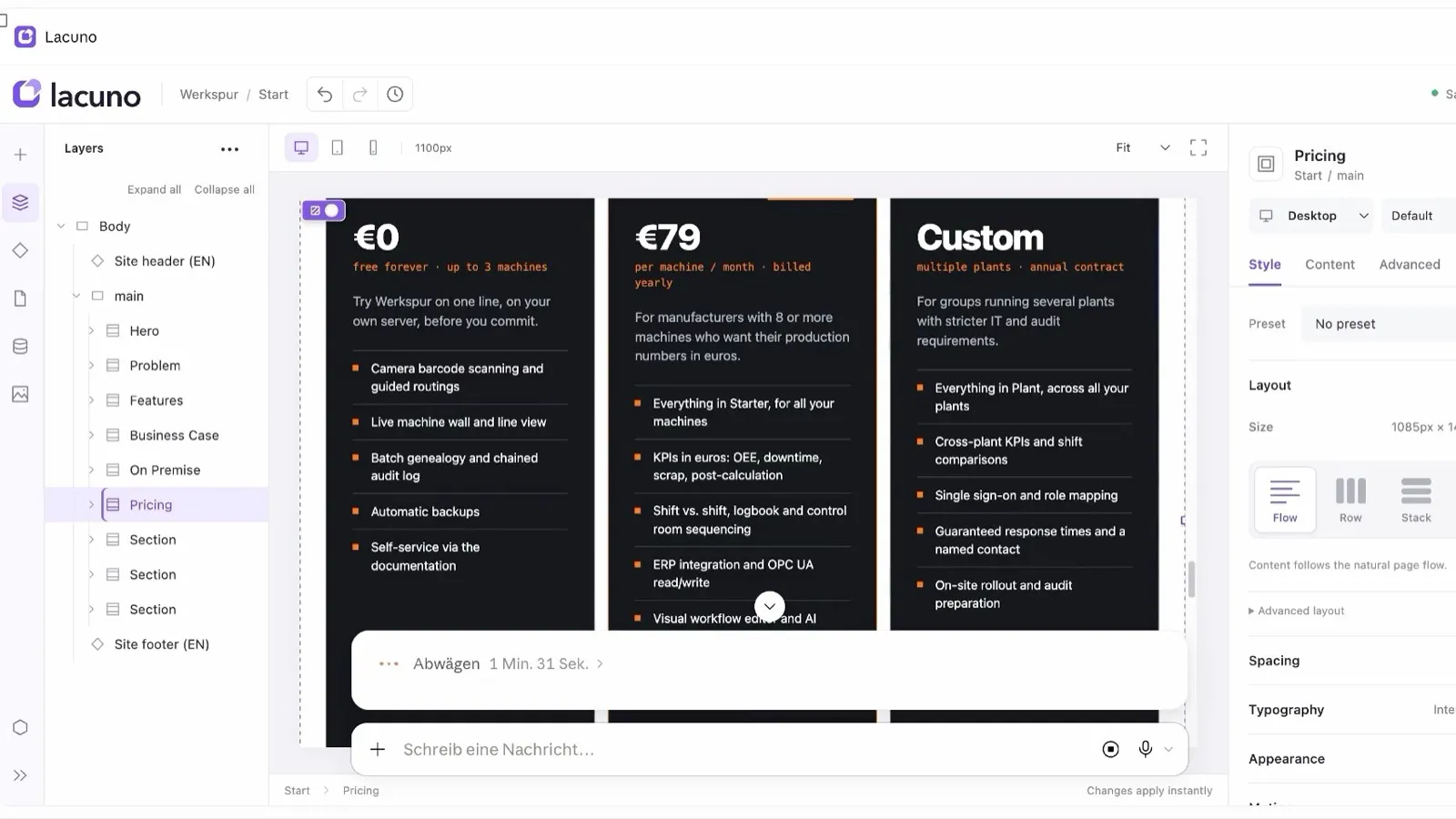
“Add a pricing section with three plans.”
Claude builds it over MCP. You watch it land.
Lacuno open inside Claude: three pricing cards from one sentence.
How it works ↓How it works
Start from scratch, or open a site you already have in Lacuno.
Give Claude, Cursor or any MCP app your site’s address and approve the connection once.
Ask for a pricing section, a new colour scheme or a blog post. Watch it land on the canvas and take over any time.
What your AI can do
Lacuno’s MCP server gives your AI the same tools you have in the editor, so its work fits your site instead of fighting it.
Sections, layouts, type, colours and spacing, using your design tokens.
It knows what you have selected and takes screenshots to check its own work.
It adds and edits CMS entries, and every entry gets its own page.
It reuses your components and adjusts styles for tablet and phone.
See it in one minute
A real site: fixed by Claude in the editor, then a pricing section from one sentence.
Watch on YouTube ↗AI tools that write code files hand you a project to host, maintain and edit in code. Lacuno keeps your site as one structured document that you and your AI edit together.
No handover
Change a heading by hand, then let Claude continue from exactly that state.
No code to maintain
Your site publishes as static files, with no runtime and no lock-in script.
No dead ends
If your AI gets something wrong, click it and change it instead of prompting again.
Bring your own AI
Lacuno doesn’t lock you into a built-in assistant. Keep your subscription, switch tools when a better model comes out, or connect several. Anything that speaks MCP works.
No lock-in
Export your whole workspace with one click and run it on your own server with Lacuno Community, or download any site as plain HTML for any host.
Open source (AGPL).
MCP, the Model Context Protocol, is the open standard AI assistants use to work with outside tools. An MCP website builder offers its editor through an MCP server, so an assistant like Claude can create and edit real pages instead of only writing code for you to paste.
Claude, Cursor, ChatGPT and Codex, plus any other app that supports MCP.
No. Design on the visual canvas, let your AI do the work, or mix both on the same page.
Yes. You and your AI edit the same page, so every change from either side shows up on the canvas and stays editable.
No. Lacuno has no built-in assistant to pay for. You connect the AI you already use, and it works through your own account.
Yes. Download any site as plain HTML for any host, or export your whole workspace and self-host it with Lacuno Community.
Open the editor in your browser and connect your AI in a minute. Sign up when you want to publish.